
Core
The Product Data Model: Master Data, Hierarchies, Variants and SKUs Explained
Stephan Spijkers · 2026-10-20 · 15 min read
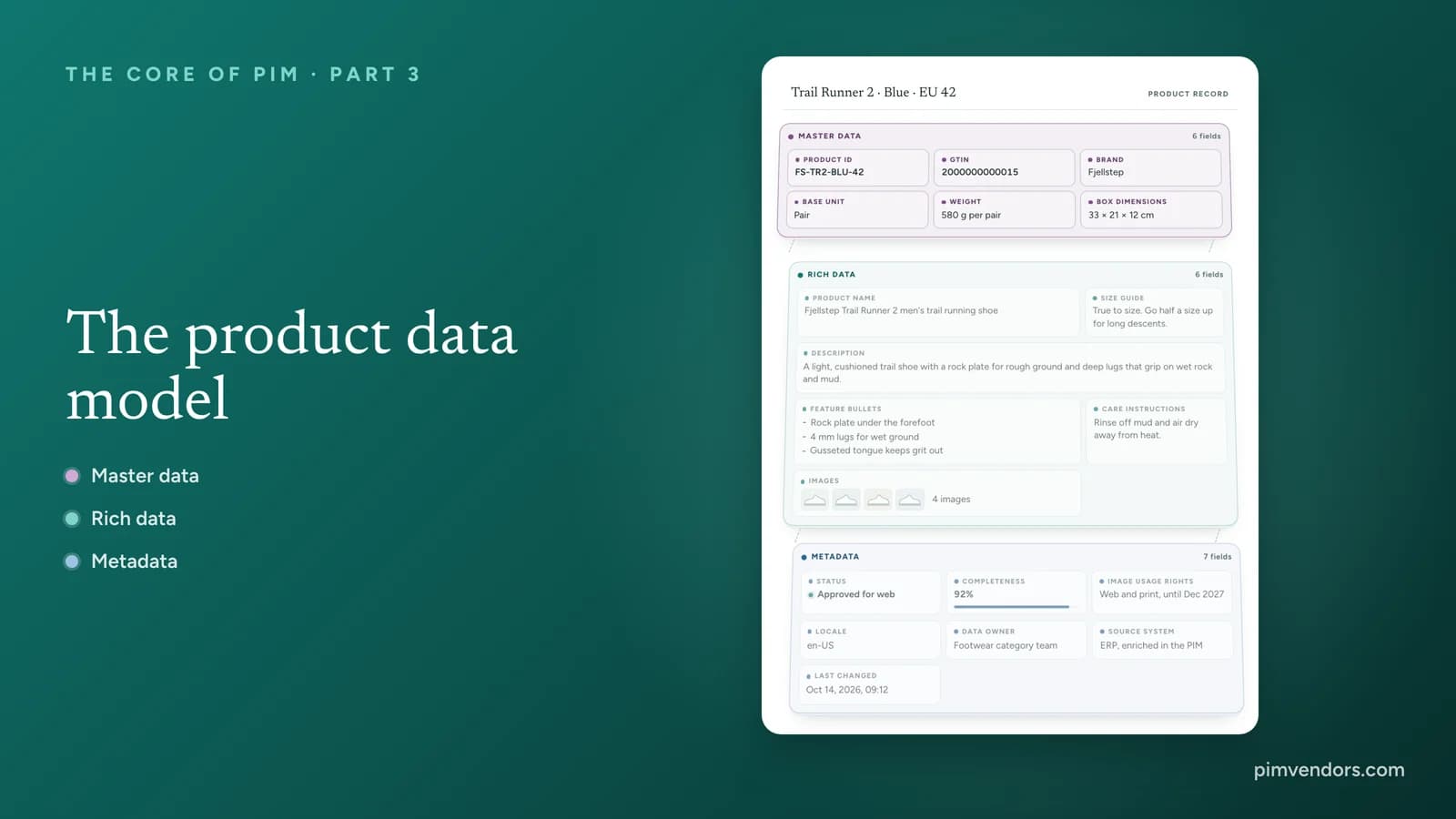
Every PIM is built on a data model: the decisions about which records exist, which attributes they carry, how they hang together and where each value lives. With a good model, a new product takes minutes and one correction reaches every channel. With a weak one, teams paste the same description into forty variants, argue about who owns the weight, and find out at launch that the marketplace needs an attribute nobody created.
This guide explains the building blocks with one running example: the Trail Runner 2, a trail running shoe from the fictional brand Fjellstep. Part 1 of this series mapped the systems around a PIM and Part 2 followed the data through onboarding, enrichment and publication. This part opens the PIM itself and looks at the structure that all of that work fills in.
Master data, rich data and metadata
Open any product record in a PIM and you see one screen of fields. Underneath, those fields belong to three different layers, and mixing them up is behind many ownership fights.
Master data identifies the product: the item number, the GTIN, the brand, the base unit, the weight and the dimensions. These are facts, not opinions, and every system that touches the product needs exactly the same values. The warehouse needs the weight, the ERP the unit, the marketplace the GTIN. Rich data explains and sells the product: the name customers see, the description, feature bullets, images, size guides and care advice. It is written for people, translated per market and shaped per channel. Metadata is data about the data: where a value came from, who owns it, when it last changed, how complete the record is and whether the images may still be used.
Interactive record
One record, three layers
Pick a layer to see which fields belong to it. Then explode the record to pull the three layers apart.
Product record
Trail Runner 2 · Blue · EU 42
- Rock plate under the forefoot
- 4 mm lugs for wet ground
- Gusseted tongue keeps grit out
Brand, product and codes are made-up examples.
Who the product is
Master data
The facts that identify the product: its codes, brand, unit, weight and size. Every system that touches the product needs exactly the same values, so they are created once, usually in the ERP or an MDM, and copied everywhere else.
- Usually owned by
- A master data team or product management, working in the ERP or the MDM
- How often it changes
- Rarely. Set when the product is created and changed only through a controlled request
- More examples
Who owns each layer
Master data usually starts outside the PIM. In the language of Part 1, the ERP or an MDM is the system of record for it, and the PIM reads a copy. A weight corrected in the PIM and not in the ERP gives you two weights and a warehouse that charges the wrong shipping. Where an MDM exists, it keeps one clean identity for the product across the company; the principles of master data management explain how. Rich data is the layer a PIM exists for. Marketing, e-commerce and category teams own it, often with first drafts from suppliers and agencies. Metadata is mostly produced by the PIM itself, with data stewards owning the workflow, quality rules and asset rights.
The three layers also change at different speeds. Master data is set once and changed through a controlled request. Rich data changes every season and every time a channel asks for something new. Metadata changes with every edit, import and approval. That is why one access rule for the whole record never works: the people who may rewrite a description every week should not be able to change a GTIN.
Metadata is what makes a record trustworthy
Metadata rarely shows up on a product page, yet the PIM cannot work without it. Completeness scores decide whether a product may be published to a channel. The workflow status decides who works on it next. Lineage tells you that a value came from a supplier file last Tuesday, not from your own team. Usage rights and expiry dates stop an image from being published after its license runs out. When people say a PIM "governs" product data, they mostly mean this layer. Product data quality and governance covers the rules that run on it.
Hierarchical and relational models
Records in a PIM connect in two basic ways. In a hierarchy, every record has exactly one parent: the category holds the product, the product holds its colors, each color holds its sizes. In a relational model, records link to each other through named, directed relations, and one record can have many links of many types. The shoe is made by a brand, replaces an older model and has accessories, and the same insole can be an accessory for two different shoes.
Interactive diagram
The same records, two shapes
Switch between a strict hierarchy and a network of typed relations. The records stay the same. Only the way they connect changes.
Hierarchy
Hierarchy: one parent each
Every record has exactly one parent. The category holds the product, the product holds its colors, each color holds its sizes. A value set high in the tree is inherited by everything below it, so one change reaches every size.
- Good for
- Where it stops
- A tree cannot say that the gaiter fits this shoe, that one insole fits two models, or that Trail Runner 2 replaces Trail Runner 1. Each of those needs a second parent, and a tree allows only one.
Most PIMs combine the two: a hierarchy for categories, product models and variants, and typed relations for everything that links across it.
What each shape is good for
A hierarchy is the right shape whenever a record has one natural parent and should share that parent's values. That covers the category tree used to classify products, the product model with its variants, and organizational trees such as product lines. Its strength is inheritance: a value set high in the tree reaches everything below it.
A relational model is the right shape for everything that links across the tree. Accessories and cross-sells, compatibility ("this battery fits these six drills"), spare parts, successors and replacements, bundles and kits, and links to documents such as manuals and safety sheets are all relations. A relation has a type and a direction, and it can carry its own attributes: the quantity of each part in a kit, or a note that an adapter is needed. For products that are assembled from parts, bills of materials in PIM and ERP explains where the relation ends and the production structure begins.
Most PIMs combine both
In practice you need both shapes at once, and usually more than one hierarchy. A typical PIM keeps a master classification that decides each product's attributes, separate navigation trees for each webshop or market, and the product models with their variants, all next to a set of relation types. A product sits in exactly one place in the master classification but can appear in many navigation trees. Keeping those apart is one of the most useful modeling decisions you can make: the merchandising team can reshuffle the webshop menu without touching a single attribute.
Inheritance and relationships
Inheritance is what makes a large catalog manageable. The product model holds everything its versions share: brand, upper material, drop, description, care advice, most of the images. Variants inherit those values and add only what makes them different, such as the color. Sizes inherit from their color and add their own size and GTIN. A shoe in two colors with three sizes each is nine records with one description to maintain.
Try it
Change it once, see it everywhere
Change the upper material on the product model and watch it travel down to every color and size. Then override it on Black.
Product model
Trail Runner 2
- Brand
- Fjellstep
- Upper material
- Engineered mesh
- Drop
- 6 mm
- Description
- Light trail shoe with a rock plate
Variant
Blue
- Color
- Blue
- Upper material
- Engineered mesh
EU 41
Engineered mesh
EU 42
Engineered mesh
EU 43
Engineered mesh
Variant
Black
- Color
- Black
- Upper material
- Engineered mesh
EU 41
Engineered mesh
EU 42
Engineered mesh
EU 43
Engineered mesh
Set once, inherited below
The product model holds what every version shares. Variants inherit those values and add only what makes them different, such as the color. Sizes inherit from their color. Fix a value at the top and nobody has to edit eight records.
Engineered mesh reached both colors and all six sizes.
Relations work differently. A relation links two records, it does not copy values. The gaiter linked as an accessory for this shoe keeps its own material, and a change here never reaches it.
Overrides: the exception, not the habit
Sometimes one variant genuinely differs. The black version gets a waterproof upper, or one color ships with a different insole. An override sets a local value on that record, and the inherited value no longer reaches it or the records below it. Overrides are useful and dangerous in equal measure. Each one is a value someone has to remember, and a team that overrides freely soon has a model where nothing inherits anymore. A good PIM shows clearly which values are inherited and which are set locally, and lets you list and reset overrides in bulk.
The rule of thumb is simple: set every value on the highest level where it is true for every record below. If it is true for the whole model, set it on the model. If it is true for one color, set it on the color.
Relations do not inherit
A relation links two records but copies nothing between them. When the gaiter is linked as an accessory for the Trail Runner 2, the gaiter keeps its own material, price and description. A change to the shoe never reaches the gaiter. That is exactly what you want: the accessory is a product in its own right, with its own owner.
Two practical points follow. First, decide where a relation lives. A relation set on the product model may or may not apply to every variant, depending on the PIM, so check how your PIM handles it before you load thousands of links. Second, decide whether relations work both ways. "Accessory for" and "has accessory" are the same link seen from two sides. Maintaining both directions by hand doubles the work and invites mistakes, so look for a PIM that keeps the reverse side in step.
How classification decides the attribute set
Classification places each product in a tree of classes, and that place decides which attributes the product gets. The root of the tree adds the attributes every product needs, such as an ID, a name, a brand and a main image. A product family adds what the family shares: every piece of footwear needs a size system and an upper material. The class adds what only it needs: a trail running shoe has a drop and a lug depth, a cordless drill a torque and a chuck size, a sofa a seat height. The product's attribute set is everything collected along its path.
Interactive builder
The class decides the attributes
Pick a product. Its place in the classification decides which attributes it gets: a few for every product, more from its family and the most specific from its class.
Classification path
- All products
- Footwear
- Running shoes
- Trail running shoes
Can map to a standard class in GS1 GPC
Attribute set
15 attributes, 11 of them required
GlobalFor every product
- Product IDTextRequired
- Product nameText, per languageRequired
- BrandListRequired
- DescriptionRich text, per languageRequired
- Main imageAsset linkRequired
- Country of originListOptional
FamilyFrom the family: Footwear
- Size systemListRequired
- Upper materialListRequired
- GenderListRequired
- ClosureListOptional
ClassFrom the class: Trail running shoes
- DropNumber, mmRequired
- Lug depthNumber, mmRequired
- Weight per shoeNumber, gRequired
- Rock plateYes or noOptional
- Waterproof membraneYes or noOptional
Your own classes can be mapped to a standard such as GS1 GPC for consumer goods or ETIM for technical products, so suppliers, data pools and customers read the same attributes.
Required, optional and per channel
The attribute set also says which attributes are required. That turns classification into the basis for completeness: a product can only be scored once the PIM knows which class it belongs to. Requirements often differ by channel, because a marketplace may demand attributes your own webshop does not show. Part 2 shows how classification and completeness work together during enrichment.
Attribute types matter just as much. A drop stored as a number in millimeters can be filtered, sorted, converted and checked. The same drop typed as free text ("6mm", "6 mm", "approx. 6") cannot. Lists with fixed values, numbers with units and yes-or-no fields are what make filters, comparisons and channel feeds work.
Your own classes and the standards
Most companies classify with their own tree, because it follows how they buy, sell and organize teams. Their trading partners often expect a standard. GS1 GPC (Global Product Classification) is used for consumer goods and in GS1 data pools. ETIM describes technical products for wholesale, and ECLASS is common in industrial purchasing. Mapping each of your classes to the matching standard class lets suppliers deliver data in a shape you can import and lets customers read your attributes without a translation table. Product classification and data standards explains each standard and when to use it.
Classification is not navigation
The master classification decides attributes. The categories in a webshop decide where a product shows up and how shoppers browse. They answer different questions and change at different speeds, so keep them as separate hierarchies. A product classified once as a trail running shoe can appear under "Running", "New in" and "Gifts for hikers" without any change to its attributes.
Entity, product, variant, SKU and item
The same words mean different things to different teams, and many project misunderstandings start here. When someone says "we have tens of thousands of products", the first question is: counted at which level?
Zoom in
From entity to item
Step through the levels. Each one sits inside the one before it, and each has its own job in the model.
Entity types
- Category
- Brand
- Supplier
- Asset
- Document
ProductTrail Runner 2
Brand · upper · drop · description
VariantBlue, size 42
Color: Blue · Size: EU 42
SKUFS-TR2-BLU-42
Stock · price · lead time
Item
- Pair in a box1 pairGTIN 2000000000015
- Carton6 pairsGTIN 2000000000022
- Blue 41
- Blue 43
- Black 42
All codes are made-up examples.
Level 1 of 5
Entity types
An entity type is a kind of thing the PIM keeps records of. Products are one type. Categories, brands, suppliers, assets and documents are others. Each type has its own attributes and its own links to the rest.
- In this example
- Product, category, brand, supplier, asset and document
- How systems use the word
- PIMEntity, object type or record type
- MDMData domain, such as product, customer or supplier
- DatabaseA table, one row per record
An entity type is a kind of thing the PIM keeps records of. Products are one type. Categories, brands, suppliers, assets and documents are others, each with its own attributes and links. A product is the model a customer recognizes and searches for: the Trail Runner 2. A variant is one version a buyer can choose, defined by its variant attributes, here the color Blue and size 42. The SKU (stock keeping unit) is the company's own code for that exact variant, used to count, store and sell it. The trade item is a unit that is priced, ordered or invoiced at a specific packaging level: one pair in a box, or a carton of six pairs.
Why the words cause trouble
An ERP usually calls every sellable unit an item and has no level above it. A webshop calls the page a product and the options on it variants. A warehouse counts SKUs in bins. Fashion teams talk about styles and color-sizes. None of these is wrong, but a model that does not name its levels clearly ends up with product pages built from ERP items, or with a separate product for every size. It also matters commercially: some PIM licenses are priced by the number of products, SKUs or records, so know which count you are quoting. PIM for fashion and apparel shows how style, color and size levels play out in a catalog where variants dominate.
GTIN, SKU and packaging levels
A SKU is internal, so a supplier and a retailer each have their own SKU for the same shoe. A GTIN (Global Trade Item Number) is issued under the GS1 system and is the same for every trading partner; it is the number in the barcode. Each packaging level that is traded gets its own GTIN, so the single pair and the carton of six can be told apart at the scanner. In the model, the GTIN belongs at the level of the trade item, not on the product model.
How to design your product data model
A data model is far easier to get right before the first import than after the first big one. These steps work for a first PIM as well as for a redesign.
Start from the channels and the questions buyers ask
List what each channel needs: the marketplace templates, the filters in your webshop, the comparison tables, the print catalog and the data pools. The questions buyers ask before they buy tell you which attributes must exist and which must be filterable.
Sort every attribute into a layer and give it one owner
Mark each attribute as master data, rich data or metadata, and name the system and the team that own it. Master data that the ERP owns is read in the PIM, not edited there.
Draw the product models and the variant axes
Decide what a product is in your catalog and which attributes create variants, such as color and size. For every attribute, decide the highest level where it is true. Keep variant levels to the choices a buyer actually makes.
Build the classification and the attribute sets
Design the class tree that decides attributes, separate from the navigation. Add global, family and class attributes with types, units and lists, mark what is required per channel, and map your classes to the standards your partners use.
Define the relation types and test with real products
Name each relation type, its direction and the attributes it carries, and decide who maintains it. Then load your most awkward products, the bundles, the spare parts and the items with ten variants, and check that the model holds them without workarounds.
Common modeling mistakes
Most of these start small and grow with every import. Changing a variant structure or a class tree later means migrating every product below it, which is why the model deserves real design time at the start of a PIM project.
What this means when you choose a PIM
PIMs differ more in their data model than their feature lists suggest. Two systems can both claim "variants" and "relations" and handle them very differently. Test the model with your own products before you compare anything else.
- Variants and inheritance: how many variant levels a family can have, whether inherited and local values are clearly marked, and whether you can find and reset overrides in bulk.
- Hierarchies: whether the PIM keeps a master classification and separate navigation trees side by side, and whether a product can appear in many navigation trees.
- Classification and attribute sets: whether attributes inherit along the class tree, whether requirements can differ per channel, and whether standards such as GS1 GPC, ETIM or ECLASS can be imported and mapped.
- Relations: typed relations with direction, attributes on the relation, and the reverse side kept in step.
- Metadata: history, lineage, completeness per channel and asset rights you can report on.
- Change: what happens when you add an attribute to a family or change a variant axis after go-live.
PIM features and capabilities puts these next to the rest of a PIM's functions, and what is PIM explains how the model fits into the system as a whole. When you are ready to compare vendors, how to select the right PIM shows how to turn your model into a scripted demo.
Where to go from here
Frequently asked questions
What is a product data model?
A product data model is the blueprint a PIM uses to store products: which kinds of records exist (products, variants, categories, brands, assets), which attributes each one has, how records are grouped into hierarchies and linked by relations, and which values are inherited. It decides what the PIM can express and how much work every new product takes.
What is the difference between master data and rich product data?
Master data identifies the product and rarely changes: the item number, GTIN, brand, units, weight and dimensions. Every system needs the same values, so it is usually created in the ERP or an MDM. Rich data sells and explains the product: names, descriptions, features, images and size guides. It changes often, is translated per market and is managed in the PIM.
What is the difference between a product, a variant and a SKU?
The product is the model a customer recognizes, such as one shoe model. A variant is one version of it that a buyer can choose, defined by variant attributes such as color and size. The SKU is the company's own code for one exact variant, used to count stock, store it and sell it. A variant usually has one SKU, but the word means something slightly different in every system.
How does attribute inheritance work in a PIM?
Values are set on the highest level where they are true and passed down. A brand or description set on the product model is inherited by every variant, and a value set on a color is inherited by every size of that color. Change it once at the top and every record below follows. A record that needs a different value gets an override, which stops the inherited value for that record and the records below it.
When should I use a product relation instead of a hierarchy?
Use a hierarchy when a record has exactly one natural parent and should inherit from it, as with categories, product models and variants. Use a typed relation when records link across the hierarchy: accessories, spare parts, compatible products, successors, bundles and kits. A relation connects two records but copies no values between them.
What is an attribute set in a PIM?
An attribute set, often called a family or template, is the list of attributes a group of products must or may have. It usually builds up along the classification: attributes every product has, more from the product family, and the most specific ones from the class. It also says which attributes are required, often per channel.
Is a GTIN the same as a SKU?
No. A SKU is a company's own internal code, so a supplier and a retailer each have a different SKU for the same item. A GTIN is a globally unique number issued under the GS1 system and printed in the barcode, so every trading partner and scanner sees the same number. Each packaging level, such as a single unit and a carton, gets its own GTIN.
How many variant levels should a product model have?
As many as there are real choices for the buyer, and usually no more than two. Fashion often uses two levels, color and then size, because images belong to the color and stock to the size. A drill sold with or without a battery needs one. Every extra level adds records to maintain, so add a level only when values truly differ at that level.
Diagnostic
Do you actually need a PIM?
Run the complexity index before you budget software or hire an SI.
Budget
Model a first-pass TCO
Translate catalog shape into a three-year cost range in under ten minutes.